Added to your basket
Quantity
Subtotal: ( items in your basket)
Sorry, unfortunately this product is currently out of stock
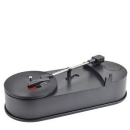
VIBE Sound VS-2006-MTS USB Mini Portable Turntable/Vinyl Archiver (Black)
£49.99
Sold out
Live Chat
Average connection time 25 secs
Average connection time 25 secs
Use the VIBE Sound VS-2006-MTS USB Mini Portable Turntable to transform your whole vinyl collection into a digital format. With this useful device you can archive your music collection in a modern format, which can be backed up and stored on your PC.
Compatible with 33 RPM records, it features a USB connection so you can connect and directly record to your computer. With the included editing software you can enhance and convert your music from records to an MP3 file format. The RCA line output means you can connect the device to your home stereo system and the portable design means you can take it with you wherever you go. - A.D.
Features:
- Mini USB Portable Turntable
- Convert your vinyl record into a digital MP3 format
- Connects via USB to your PC
- RCA line output for home stereo connection
- Vibe
Customer Reviews
Top Customer Reviews
Where reviews refer to foods or cosmetic products, results may vary from person to person. Customer reviews are independent and do not represent the views of The Hut Group.
A good idea
Was really looking forward to this VIBE Sound VS-2006-MTS USB Mini Portable Turntable/Vinyl Archiver and looked for all my old records to get them downloaded. When recording, the machine picked up all the sounds from the tv and me moving around. I don't know why this happened but it did not have the selection for playing it through your PC and I downloaded on the new and old PCs, and it still didn't work!
Was this helpful?
Mini USB Turntable
Very disappointed with the information provided for the VIBE Sound VS-2006-MTS USB Mini Portable Turntable/Vinyl Archiver. I have not yet been able to use it properly. The 'help' manual downloaded is no help at all unless you already know what you are doing. To save files as an MP3 format, a message comes up that you need a certain program. The link to this program does not work. So far I have only managed to download a record to my computer, but only in a .wav format, which I am told takes up a lot of memory.
Was this helpful?