Added to your basket
Quantity
Subtotal: ( items in your basket)
Sorry, unfortunately this product is currently out of stock
Samsung SE-208BW Optical SmartHub Wi-Fi Streamer for USB Storage and DVD/CD
£129.99
Sold out
Live Chat
Average connection time 25 secs
Average connection time 25 secs
Create the ultimate home entertainment system with the Samsung Optical Smart Hub SE-208BW Wireless media hub.
Stream your DVDs and CDs across multiple devices, giving you the chance to share and enjoy your favourite films or music in the way you prefer. Watch a film on the big screen, wirelessly deliver it your PC, Smartphone, tablet or laptop as if it was connected directly to the device. Store your media content on a DVD, CD, USB storage device or even on a network thanks to the huge array of connectivity options on the Optical Smart Hub.
A built in Wi-Fi connection can be used to create a simple access point for all your devices. Using high speed 802.11g wireless technology, you can connect your mobile, computer, Mac, tablet and more to the Optical Smart Hub for instant internet connectivity.
Samsung Optical Smart Hub SE-208BW - How does it work?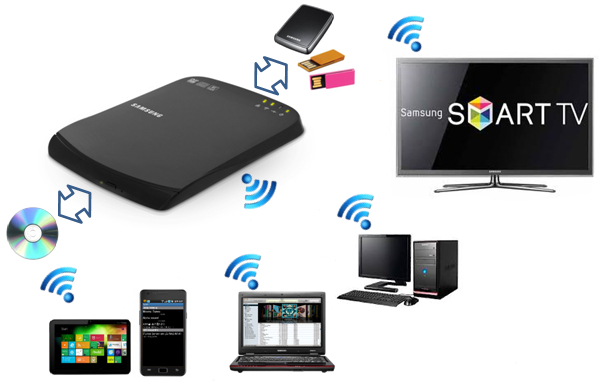
Portable, you can even use the SE-208BW to connect your devices together while you're on the move. Just plug it into a spare USB port on your Laptop, connect your devices to the network and stream your content til your heart's content.
Compatible with iOS and Android devices, Windows and Mac OS X systems, as well as your next generation internet connected TVs, the SE-208BW is the perfect way to bridge the gap between all your media. The included iOS and Android Smart Hub App lets you easily manage, control and access your media files when in range of the SE208BW. Take total control of the settings and customise them to suit your preferences all from the easy to use, fluid interface.
Keep your data backed up in times of crisis. Thanks to the storage technologies of the Smart Hub, you can easily back up all your content to a USB storage device or connected system. (MM)
| Model | SE-208BW Optical Smart Hub | |
| Wireless | Compliant Standard | IEEE 802.11 b/g (It is possible to use 802.11n) |
| Frequency Range | 2.412 to 2.472 MHz | |
| Access Method | CSMA / CA | |
| Data Transfer Method | DDSS, OFDM, Half Duplex | |
| Data Transfer Speed (Max) | 802.11b - 11Mbps 802.11g - 54Mbps | |
| WDS | Supported | |
| Encryption Type | WEP, WPA-PSK, WPA2-PSK, MIXED | |
| WAN | Compliant Standard | IEEE 802.3 / 802.3u / 802.3ab (10base-T, 100base-Tx) |
| Access Method | CSMA / CD | |
| ISP Protocols Supported | Static IP, DHCP Client, PPPoE | |
| Audio | Auto MDI-X, RJ-45 | |
| DLNA | DMS | Supported (Samsung AllShare Supported) |
| iSCSI | Supported (read-only) | |
| CDDA | Supported with the iOS/Android Optical Smart Hub app only. | |
| DVD Playback | Supported with the iOS/Android Optical Smart Hub app only. | |
| Smart Backup | USB | Supported with the iOS/Android Optical Smart Hub app only. |
| ODD | Supported with the iOS/Android Optical Smart Hub app only. | |
| FTP | Supported (Using FTP Software) | |
| SAMBA | Supported | |
- Samsung
Customer Reviews
Top Customer Reviews
Where reviews refer to foods or cosmetic products, results may vary from person to person. Customer reviews are independent and do not represent the views of The Hut Group.
The Gap filler
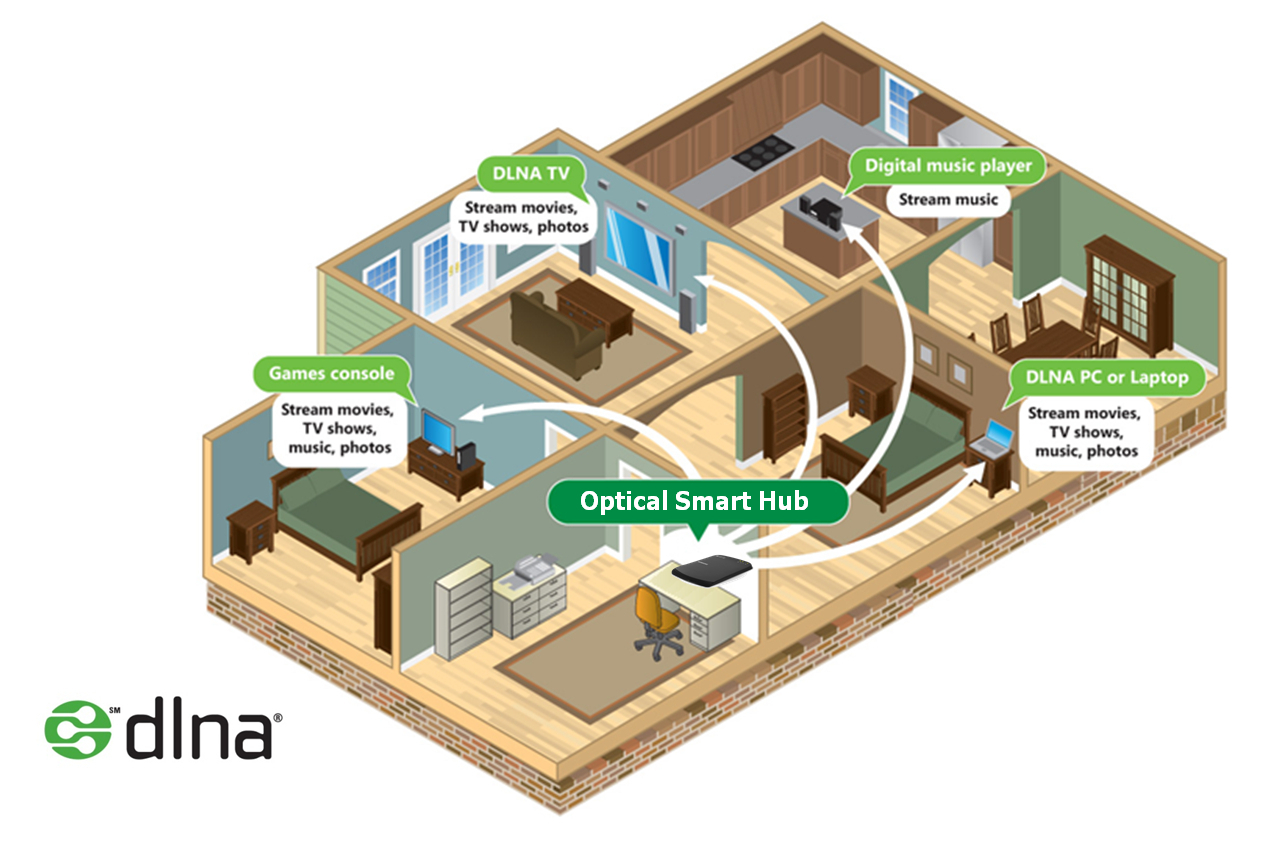
The Samsung SE-208BW Optical SmartHub Wi-Fi Streamer for USB took a little fiddling with to get it the way I want it but its an awesome bit of kit. I use mine on my own network via the RJ45 lead and its a little beauty. Having amassed a library of DVD's over the years and primarily using an iPad around the home. I have no way to watch these movies on it unless I go through the process of ripping them, putting them onto the NAS and then waiting for the NAS to update which is a time consuming process. Now, bung a disc in the drive, open the app on the iPad and I'm away watching DVDs or streaming data from the HD that I've plugged into it. This also appears in my DLNA supported apps and Playstation.
Was this helpful?